Fault codes
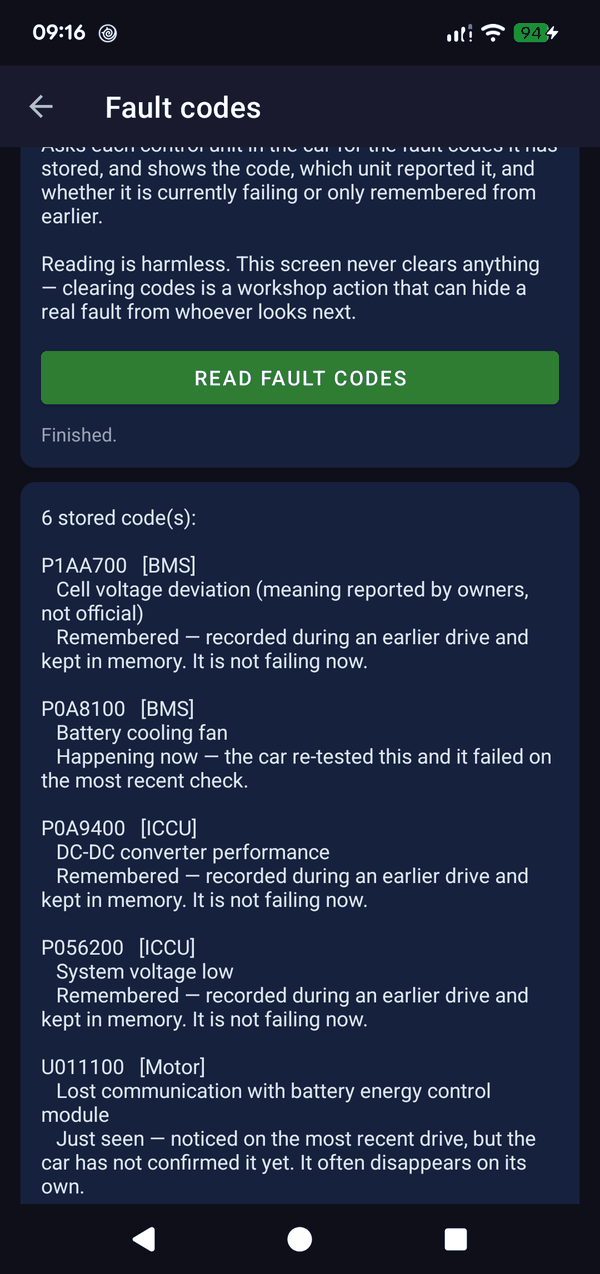
This screen asks every control unit in the car — battery management, the on-board charger, the motor, the ABS and the rest — for the fault codes it has stored, and lists what comes back. For each one you get the code, which unit reported it, and a plain-English description of what it refers to.
The part that matters: a stored code is not the same as a current fault. Each entry says which it is — “Happening now” (the car re-tested it and it failed again), “Remembered” (recorded on an earlier drive, not failing today), or “Just seen” (noticed once, not yet confirmed — these often disappear on their own). Without that distinction a list of codes tells you very little.
Reading is completely harmless, and this screen never clears anything. That is deliberate: clearing codes is a workshop action, and wiping them just hides a real fault from whoever looks next — including the garage you were about to visit.
Fault codes are a phone screen: reading and clearing codes resets the adapter, which would fight the car display for the one connection. It is not part of Android Auto.